CVR Asset Info
The CVR Asset Info component carries the GUID and compatibility metadata for an uploaded asset (avatars, worlds, or spawnables). It is automatically added as a required sub-component of CVR Avatar and CVR World, and required for spawnables.
Fields
Section titled “Fields”AssetType enum:
AvatarWorldSpawnable
Set automatically by the owning component (CVRAvatar.Awake, CVRWorld.OnEnable, or the CCK publish flow).
Object Id
Section titled “Object Id”string. The asset’s GUID (formerly guid in older CCK versions; renamed via FormerlySerializedAs). This is what the backend uses to decide which record the upload updates.
Unity Version
Section titled “Unity Version”string. Unity version the asset was published with. Used by GetUnityVersion() to produce a UnityVersion for loader fallback.
CCK Version
Section titled “CCK Version”string. CCK version used when publishing. Returned by GetVersion() as a CCKVersion.
Unique Identifier
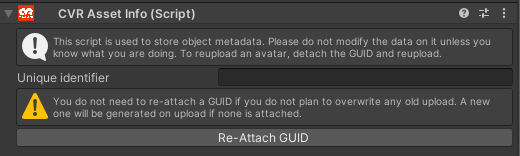
Section titled “Unique Identifier”Text identifier used to decide which ID the GameObject is uploaded to or as.
Re-Attach GUID
Section titled “Re-Attach GUID”Attaches the ID in the Unique Identifier field to the current GameObject.
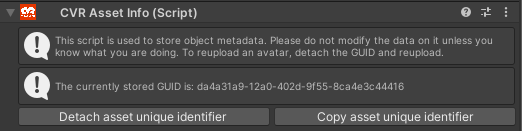
Detach asset unique identifier
Section titled “Detach asset unique identifier”(When attached) Detaches the GUID so it can be changed. The previous value stays in the field.
Copy asset unique identifier
Section titled “Copy asset unique identifier”(When attached) Copies the GUID for use on another asset or for storage (for example, one asset being uploaded to two accounts).
Finding your Asset’s GUID
Section titled “Finding your Asset’s GUID”Existing GUIDs for your uploaded assets can be found on the Hub under My Content by managing the appropriate asset type.

Related
Section titled “Related”Source
Section titled “Source”CVR-GameFiles/ABI.CCK.Components/CVRAssetInfo.cs